Read a book and listen to it at the same time.
Entzun takes your ebook and its audiobook, lines them up word by word on your device, and lights up each word as the narrator reads it. For readers with dyslexia or ADHD, language learners, and anyone who reads better with a voice alongside.
Works with the books you already own, from any shop. No account, no server, nothing sent anywhere.
Free to try with one book. Then 19.99 USD/EUR, once, until 1 January 2027. No subscription. iPhone and Mac, iOS 26 or macOS 26.
“Look ye! d’ye see this Spanish ounce of gold?”—holding up a broad bright coin to the sun—“it is a sixteen dollar piece, men. D’ye see it? Mr. Starbuck, hand me yon top-maul.”
While the mate was getting the hammer, Ahab, without speaking, was slowly rubbing the gold piece against the skirts of his jacket, as if to heighten its lustre, and without using any words was meanwhile lowly humming to himself, producing a sound so strangely muffled and inarticulate that it seemed the mechanical humming of the wheels of his vitality in him.
Receiving the top-maul from Starbuck, he advanced towards the main-mast with the hammer uplifted in one hand, exhibiting the gold with the other, and with a high raised voice exclaiming: “Whosoever of ye raises me a white-headed whale with a wrinkled brow and a crooked jaw; whosoever of ye raises me that white-headed whale, with three holes punctured in his starboard fluke—look ye, whosoever of ye raises me that same white whale, he shall have this gold ounce, my boys!”
“Huzza! huzza!” cried the seamen, as with swinging tarpaulins they hailed the act of nailing the gold to the mast.
“It’s a white whale, I say,” resumed Ahab, as he threw down the topmaul: “a white whale. Skin your eyes for him, men; look sharp for white water; if ye see but a bubble, sing out.”
All this while Tashtego, Daggoo, and Queequeg had looked on with even more intense interest and surprise than the rest, and at the mention of the wrinkled brow and crooked jaw they had started as if each was separately touched by some specific recollection.
“Captain Ahab,” said Tashtego, “that white whale must be the same that some call Moby Dick.”
Built for people who read with their ears too.
If a page of text is hard going.
Hearing each word as you see it is one of the oldest ways to make reading stick. Dyslexic readers, readers with ADHD and readers with low vision have used paired text and audio for decades. Entzun does it with any book, at your speed, in the typeface and spacing that work for you.
If audio alone loses you.
Audiobooks are easy to drift out of. With the page in front of you, a wandering mind has somewhere to land, and a tap on any word takes the narrator back to it.
If you are reading in a second language.
See the spelling while you hear the pronunciation, slow the narrator to 1×, and tap a sentence as many times as you need. Nothing is looked up or sent anywhere.
Reading is not one thing, so the page is not one thing either.
Hearing the words is half of it. The rest of the reader is built so that the page itself can get out of the way.
Typefaces chosen for legibility
Five faces, each there for a reason. Atkinson Hyperlegible Next and Luciole were drawn for low vision, Lexend to reduce visual stress, and OpenDyslexic weights the bottom of each letter so lines stop swimming. Newsreader is the book face.
One sentence at a time
Single sentence mode shows only the sentence being narrated, in the middle of the page, and moves on when the narrator does. On a full page, the sentence being read stays at full strength and the rest steps back.
Every spacing on the page is yours
Text size, or follow the system. The space between characters, words, lines and paragraphs, each on its own slider.
Natural or justified alignment, and the width of the column. Paper, Sepia, Night, High Contrast, or the system's palette.
The spoken word marked with a highlight or an underline. Try the sliders on this very text.
Two files in, one book out.
Add both files
Pick the ebook, as EPUB or plain text, and the audiobook, as m4b, mp3 or m4a. Entzun keeps its own copy and offers to delete the originals.
It syncs on your device
The speech recogniser built into iOS and macOS transcribes the narration, and Entzun lines it up with the text word by word. A long book takes minutes, once, and you can start reading as soon as the first chapter is done.
Read and listen
Open the book and the narration starts where you left off. The word being spoken is marked, and the sentence being read stays in the middle of the page.
The page is the whole point.
Nothing sits over the sentence being read. The player floats well below it, and the controls can be hidden until it is just the book.
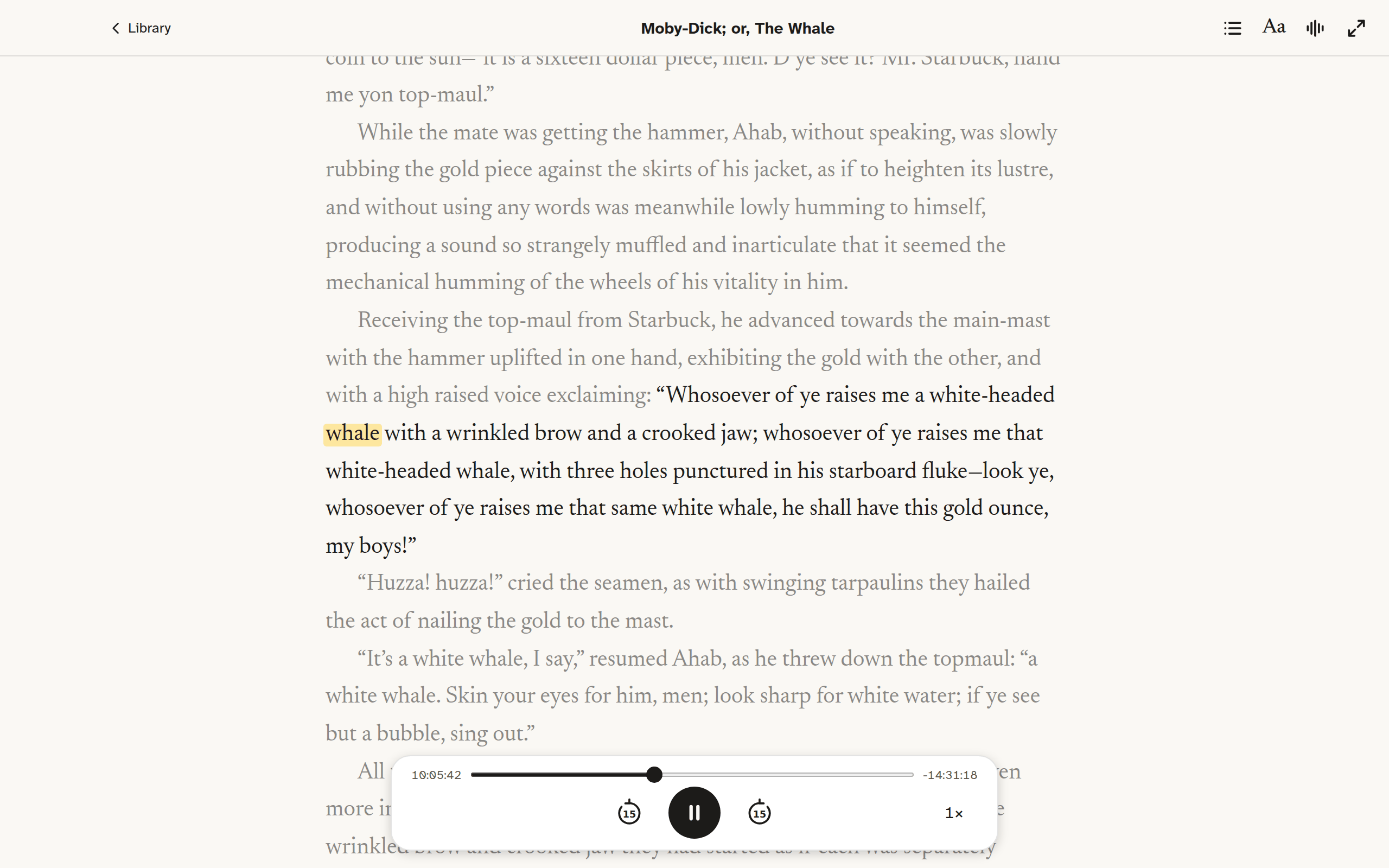
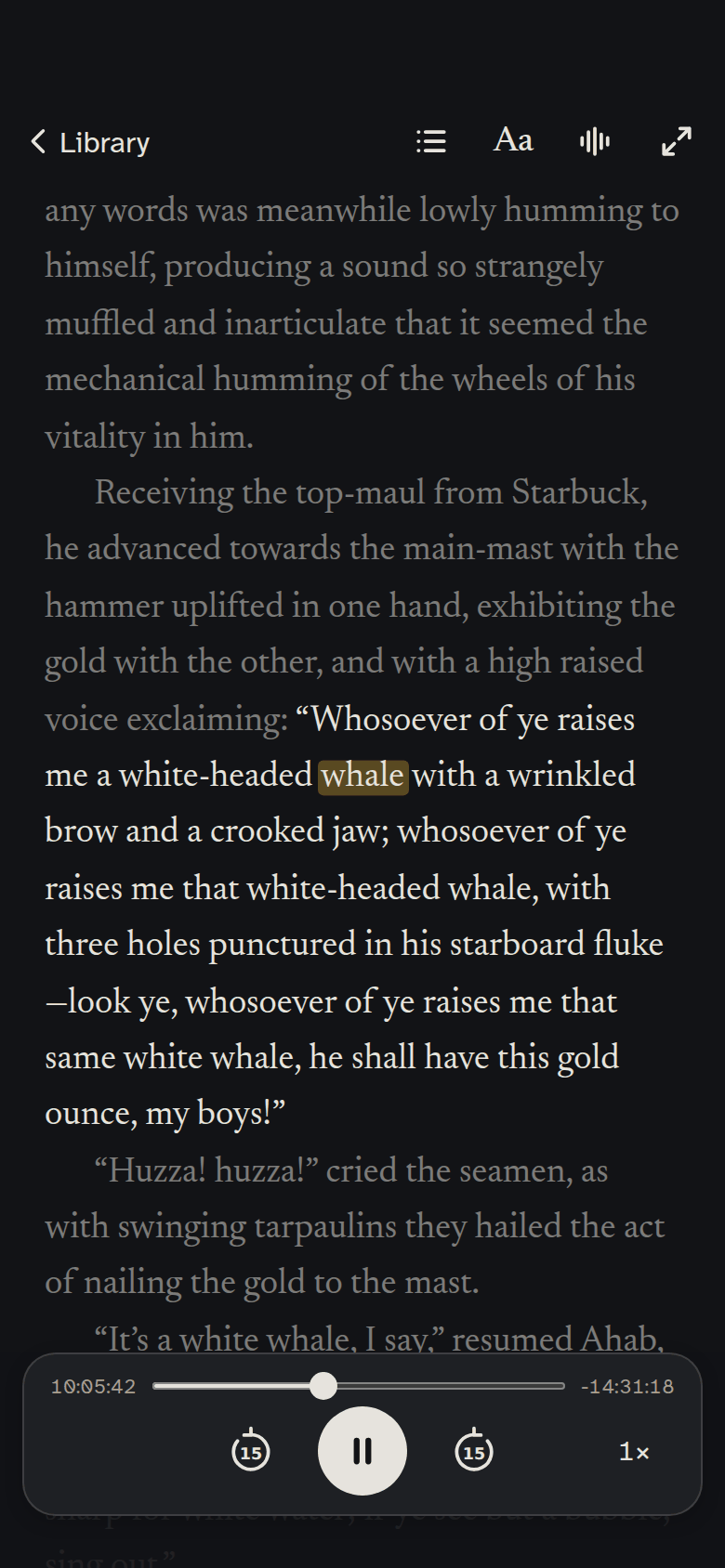
“Look ye! d’ye see this Spanish ounce of gold?”—holding up a broad bright coin to the sun—“it is a sixteen dollar piece, men. D’ye see it? Mr. Starbuck, hand me yon top-maul.”
While the mate was getting the hammer, Ahab, without speaking, was slowly rubbing the gold piece against the skirts of his jacket, as if to heighten its lustre, and without using any words was meanwhile lowly humming to himself, producing a sound so strangely muffled and inarticulate that it seemed the mechanical humming of the wheels of his vitality in him.
Receiving the top-maul from Starbuck, he advanced towards the main-mast with the hammer uplifted in one hand, exhibiting the gold with the other, and with a high raised voice exclaiming: “Whosoever of ye raises me a white-headed whale with a wrinkled brow and a crooked jaw; whosoever of ye raises me that white-headed whale, with three holes punctured in his starboard fluke—look ye, whosoever of ye raises me that same white whale, he shall have this gold ounce, my boys!”
“Huzza! huzza!” cried the seamen, as with swinging tarpaulins they hailed the act of nailing the gold to the mast.
“It’s a white whale, I say,” resumed Ahab, as he threw down the topmaul: “a white whale. Skin your eyes for him, men; look sharp for white water; if ye see but a bubble, sing out.”
All this while Tashtego, Daggoo, and Queequeg had looked on with even more intense interest and surprise than the rest, and at the mention of the wrinkled brow and crooked jaw they had started as if each was separately touched by some specific recollection.
“Captain Ahab,” said Tashtego, “that white whale must be the same that some call Moby Dick.”
Everything but the book, gone.
One tap and the toolbar, the player and the clock leave the screen. The page stays, edge to edge, and the narration carries on.
“Look ye! d’ye see this Spanish ounce of gold?”—holding up a broad bright coin to the sun—“it is a sixteen dollar piece, men. D’ye see it? Mr. Starbuck, hand me yon top-maul.”
While the mate was getting the hammer, Ahab, without speaking, was slowly rubbing the gold piece against the skirts of his jacket, as if to heighten its lustre, and without using any words was meanwhile lowly humming to himself, producing a sound so strangely muffled and inarticulate that it seemed the mechanical humming of the wheels of his vitality in him.
Receiving the top-maul from Starbuck, he advanced towards the main-mast with the hammer uplifted in one hand, exhibiting the gold with the other, and with a high raised voice exclaiming: “Whosoever of ye raises me a white-headed whale with a wrinkled brow and a crooked jaw; whosoever of ye raises me that white-headed whale, with three holes punctured in his starboard fluke—look ye, whosoever of ye raises me that same white whale, he shall have this gold ounce, my boys!”
“Huzza! huzza!” cried the seamen, as with swinging tarpaulins they hailed the act of nailing the gold to the mast.
“It’s a white whale, I say,” resumed Ahab, as he threw down the topmaul: “a white whale. Skin your eyes for him, men; look sharp for white water; if ye see but a bubble, sing out.”
All this while Tashtego, Daggoo, and Queequeg had looked on with even more intense interest and surprise than the rest, and at the mention of the wrinkled brow and crooked jaw they had started as if each was separately touched by some specific recollection.
“Captain Ahab,” said Tashtego, “that white whale must be the same that some call Moby Dick.”
Hear it from there.
Every word on the page is a place in the recording. Tap one and the narration jumps there; scroll away and a pill takes you back.
The rest is there when you want it.
Silence when you want it
Pause the narration and read as you would any ebook. Start it again and it picks up from the sentence you are on.
iPhone and Mac
Native on each, with the same library and reader; on the Mac it can fill the screen. With iCloud, a book added on one is on the other, at the same page. How sync works.
Playback that fits the book
Skip fifteen seconds either way, choose a speed from 1× to 1.7×, and see the time played and left.
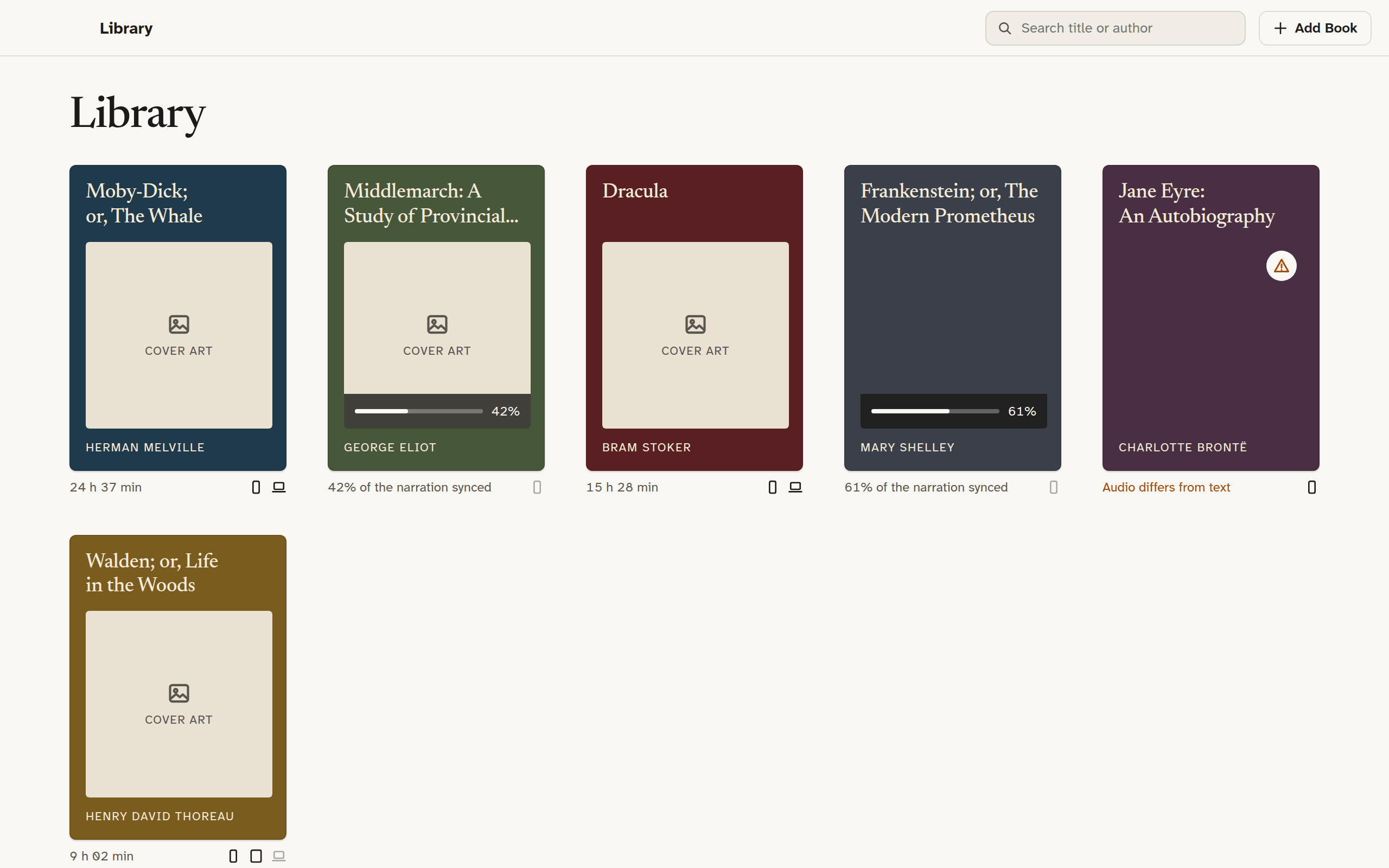
A shelf that says what is going on.
Under every cover, one line of truth: how long the narration is, how much has synced, or, when the recording does not follow the text, a plain “Audio differs from text”.
From the beta
[QUOTE 1 - a dyslexic reader or the parent of one]
[QUOTE 2 - someone who finishes more books this way]
[QUOTE 3 - a language learner]
Two files, and where to find them.
Entzun does not sell books. You bring the ebook and the audiobook, and they need to be files you can open, not ones locked to another app. That rules out Audible and Kindle purchases, which are protected. It leaves plenty:
- Libro.fm and Downpour sell audiobooks as plain files you keep.
- Project Gutenberg and Standard Ebooks have tens of thousands of out-of-copyright ebooks; LibriVox has free recordings of many of them. Quality varies, so look for a single-narrator reading.
- Audiobook CDs you own rip to mp3 or m4a with the tools already on your Mac.
- Ebooks from any shop that sells them without protection, and any EPUB you already have.
A studio recording of the same edition, one narrator, unabridged, gives the best result.
One price. No account.
Entzun is free to download, with one book unlocked in full, so you can see your own files line up before you pay anything. Unlocking it for every book is 24.99 USD/EUR, once, for iPhone and Mac together, or 19.99 until 1 January 2027. Family Sharing covers everyone in your household.
Reading apps sold by subscription cost more than that every year. Entzun has no subscription, nothing to sign up for and nothing that stops working if a server goes away, because there is no server.
Your books never leave your device. Neither does anything about you.
There are no accounts, no analytics, no crash reporter and no third-party code of any kind. Transcription happens on the device, with the speech recogniser Apple ships in the system. Entzun has no server and looks nothing up. The one place your books go is your own iCloud, if you are signed in, so that your other devices can have them; that is storage Apple runs for you, not for us.
That is the whole policy, more or less. The long version is short too.
Read the privacy policyWhat Entzun needs from you
An iPhone on iOS 26 or a Mac on macOS 26, and two things more. The free book lets you check both before you pay.
Both files, yours. The ebook and the audiobook, as files you can open. Where to find them.
The same text, read in full. An abridged recording or a different edition will not line up with the words on the page.